Three steps, about ten minutes.
- Export from OpenTable
In OpenTable's restaurant tools, go to Reporting, then Reservations. Set the status to Booked, pick a date range from today, then Export.
- Upload it to Seated
In Seated, go to Settings, then Bring bookings, and upload the file. It works with CSV and Excel files.
- Check, then import
Seated shows what it found: upcoming bookings, past visits for guest history, and anything it's leaving out, like cancellations. Fix any column it got wrong, then import. Each booking goes on a free table that fits.
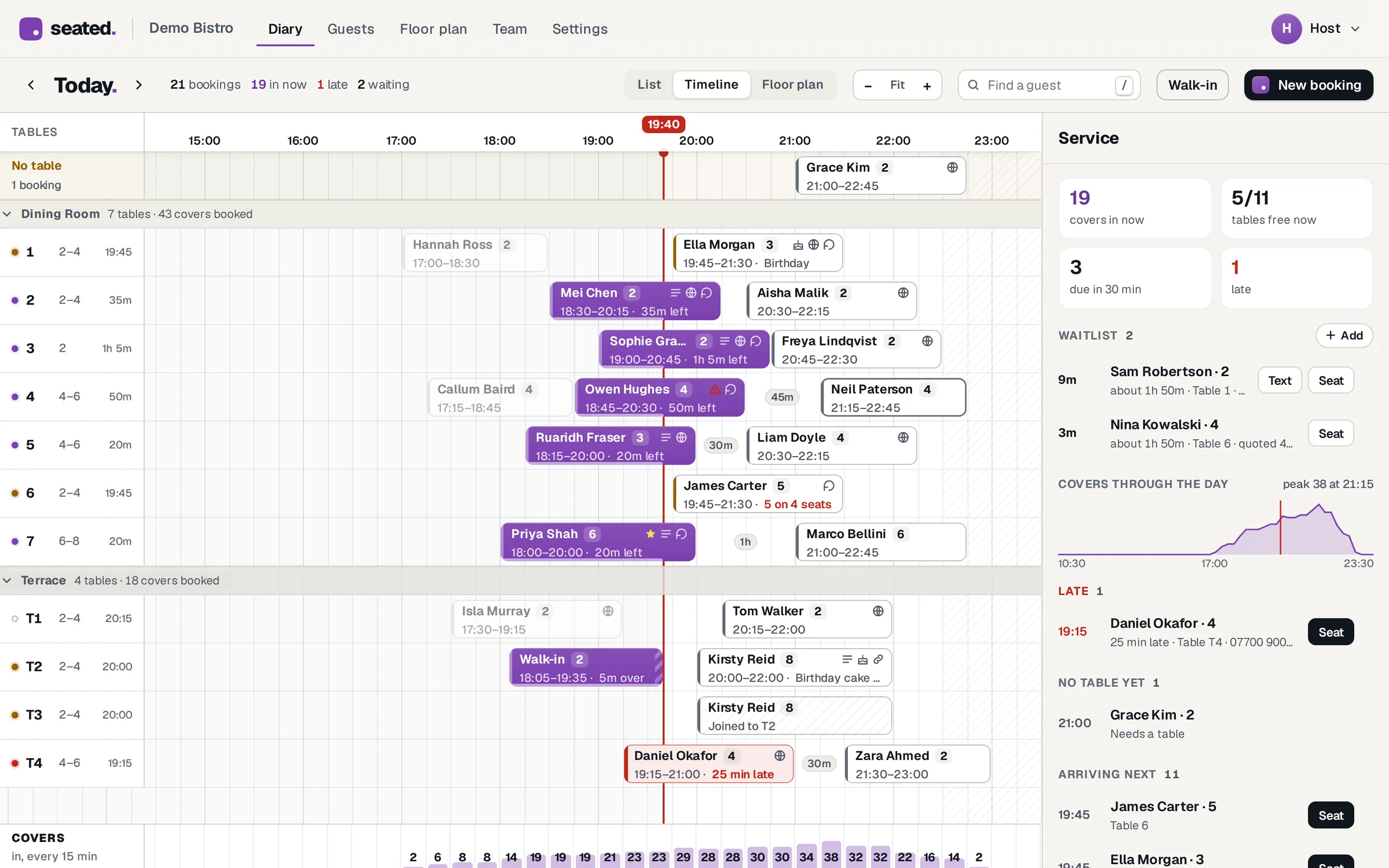
What a night on Seated looks like.
Every table, the whole night.
A timeline with a row for each table, a list for the phone and your floor plan, all live. Drag a booking to another table or time and Seated checks it doesn't clash first.
Allergies the kitchen can't miss.
Tick them on the booking, or guests tick them when they book online. They show in red on the diary and on the pre-shift sheet, and they stay with the guest for next time.
Walk-ins and the waitlist.
Seat a walk-in in two taps, or put them on the waitlist with a quoted wait. The floor plan lights up the tables that are free now.
Your own booking page.
Your photos, opening hours and reviews from guests who really came. It only offers times you have free, and guests get a confirmation, a reminder and a link to cancel.
Set menus and pre-orders.
Put a Christmas menu on your page with a price per head. Each guest picks their dishes before the day and the kitchen sheet adds it all up.
Try it before you move.
Open a practice copy of our demo venue with a busy night booked in, no sign-up. Move things around, seat people, add a walk-in.
Before you move.
Will my guests be emailed when I move?
No. Their bookings were already confirmed by OpenTable, so Seated doesn't send them a confirmation or a reminder for anything you bring across. New bookings made in Seated get the usual emails.
Can I keep OpenTable running while I switch?
Yes. Bring your bookings across, try Seated alongside it, then upload a fresh export from OpenTable before you switch over. Anything already in your Seated diary is left alone, so only new bookings are added.
Could the dates come in the wrong way round?
Seated works out whether a file's dates are day first (24/10) or month first (10/24), and the check page shows which it picked. You can switch it there before anything is added.
What if the export doesn't look how you expect?
Seated matches columns by their headings, and the check page lets you point it at the right column if it guessed wrong. Menus in other systems move around between versions, so if a step doesn't match, look for Export or Reports.
How much is it?
The first month is free. After that it's £29.99 a month per venue with everything included. There's no charge per booking or per guest, no setup fee and no contract, so you can leave whenever you like.
See it with a busy night in it.
Open a practice copy of our demo venue, no sign-up, or start your free month and bring your bookings across.
OpenTable is a trademark of its owner. Seated isn't connected with OpenTable.